PaaS, or Platform as a Service, is a set of cloud-based technologies that allow Software as a Service (SaaS) applications to be developed and hosted on a high-level programming platform. It differs from Infrastructure as a Service (IaaS) in that it provides higher level services and capabilities rather than pure infrastructure. Where IaaS platforms, such as Amazon Web Services (AWS), Microsoft Azure, and Google Cloud, provide basic compute, storage, and networking capabilities on which SaaS applications can be hosted, PaaS typically provides services such as security, auto-scaling of application compute and storage, analytics capabilities, and built-in user interfaces. In addition, PaaS platforms may provide unique programming models (i.e., programming languages and database capabilities), development tools, and deployment tools that support cloud-based application development.
A big difference between PaaS and IaaS is in provisioning and pricing. IaaS users need to explicitly manage provisioning and operation of the server infrastructure, just as they would in any hosted infrastructure. If the application needs more server resources, the user must provision it and start it up. PaaS users are hidden from the underlying infrastructure and do not need to explicitly provision it, though they still are responsible for monitoring application performance. IaaS pricing is compute unit based, by CPU, memory, secondary storage, etc. PaaS pricing is often consumption based: by transaction, throughput, data usage, simultaneous users, etc.
With a plethora of these platforms becoming available, some important questions that we will answer in this article include:
- How do these platforms differ?
- What are the benefits and challenges of using them?
- When and for what types of applications is it appropriate to use PaaS, and when is it not?
Comparison of PaaS Platforms
In their paper, “Comparing PaaS offerings in light of SaaS Development,”1 researchers from the University of Leuven in Belgium classify PaaS platforms in three categories:
- PaaS platforms that mimic the APIs of popular enterprise application servers and middleware platforms, such as Windows Azure using the .NET platform. Other examples include Amazon Elastic Beanstalk, Cloud Foundry, Heroku, IBM SmartCloud.
- Focused PaaS platforms that aim to optimally support specific types of cloud applications through middleware and storage facilities that scale, such as Google App Engine. Other examples include AppScale, GigaSpaces XAP Elastic Application Platform.
- Metadata-driven PaaS platforms that introduce higher-level configuration and composition interfaces that abstract typical middleware interfaces and specifically support SaaS applications. An example of this type of PaaS platform is Salesforce’s Force.com platform. Other examples include Cordys PaaS, TCS InstantApps, WOLF.
Each type of PaaS platform has features and benefits that are designed to enhance the development of cloud-based SaaS applications. Likewise, each type of platform introduces certain tradeoffs for the developer.
Microsoft Azure
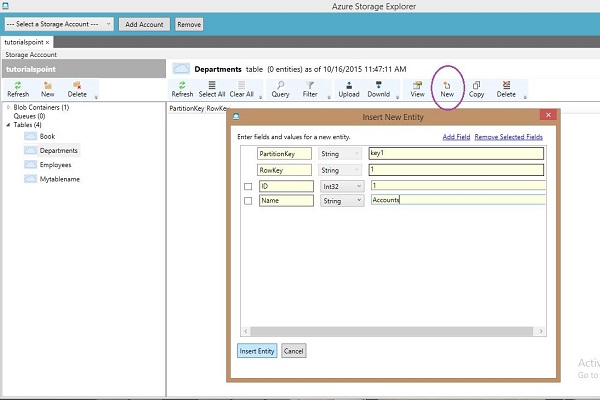
The first category of PaaS platform allows for easy migration of existing SaaS applications into the cloud. Windows Azure is the most well-known of this type of platform. It provides complete support for the C#/.NET programming model, allowing existing .NET applications to be run in the Azure platform with minimal changes. Azure supports the SQL Server database, so applications that are written for it can directly migrate. It also provides a NoSQL database model called Azure Table Storage, which does require specific programming but can provide a “big data” model for cloud applications. Most of Microsoft’s frameworks, like WCF, ADO.NET, MVC, and Unity, are available as platform services. Like some other platforms we discuss, such as Google Cloud and AWS, Microsoft Azure can also be used as IaaS, taking advantage of its many compute and storage options.
One important platform feature Microsoft Azure does not directly support is multi-tenancy. Multi-tenancy is the ability to share application infrastructure between multiple users (tenants) while maintaining data isolation and user configurability. Developers of SaaS applications on the Azure platform must explicitly program for multi-tenancy using traditional techniques, such as virtual table IDs in the database, schema-based isolation of user data, and parameterized user configurations through mechanisms like dependency injection.
Google App Engine
In the second category of PaaS platforms, higher level features are provided to support cloud application development, but taking advantage of these features requires significant changes to an existing SaaS application’s code. For example, Google’s App Engine (GAE) supports programs written in the Java programming language and other languages (e.g., Python, Ruby) that use the Java Virtual Machine (JVM). However, it supports a “white-list” subset of Java classes that can be used on the platform, and a business object model that differs from traditional Java-based enterprise application frameworks, such as Enterprise Java Beans (EJBs).
Likewise, the persistence and data access model for GAE is different than the traditional SQL RDBMS model common in enterprise SaaS applications. Its data store is based on a NoSQL database. Traditional SQL data access is provided through an object relational mapping abstraction through the JPA interface. This type of access does not support all SQL expressions, like joins. JDO (Java Data Objects) is an alternative database abstraction which can be used for new applications. GAE also only supports outbound REST API calls, and does not support SOAP-based JAX-WS APIs.
Thus a developer essentially needs to reprogram an existing enterprise SaaS application to take advantage of other higher level features of the platform, such as auto-scaling, which allows GAE apps to automatically support increased loads without specific programmer intervention. This is an example of how PaaS differs from IaaS, which requires explicit provisioning of additional infrastructure resources.
GAE does provide some features that support multi-tenancy, unlike Microsoft Azure. These include a Namespace API that supports data isolation. However, use of the namespace requires manual mapping of requests to the namespace, which in turn requires specific programming to provide multi-tenancy. There is also a dependency injection framework for user configuration support, similar to the capability provided by Azure.
GAE features sit on top of the Google Cloud IaaS platform, so like Microsoft Azure, the Google platform can be used for direct hosting of SaaS applications in the cloud without taking advantage of GAE’s higher level services.
Like GAE, AWS provides both IaaS capabilities, and some higher-level PaaS services. AWS is more commonly thought of as an IaaS platform, allowing one to configure and control virtual machines that support JVM-based and .NET-based architectures, and SQL, NoSQL, or Big Data based storage models. However, the availability of higher level services, like AWS Elastic Beanstalk that supports containerized deployment models and auto-scaling of application infrastructure, provides PaaS-like features to the developer.
Force.com
The third category of PaaS platforms differ greatly from the other two, in that it supports a programming and data model that is specifically designed for developing multi-tenant cloud based applications. The most notable example of this type of platform is Force.com, the PaaS platform developed by Salesforce.com. It has a unique programming model based on the Java-like Apex programming language. It also has a native user interface and UI programming language, VisualForce. Force.com is designed for business applications development. These applications can be extensions of CRM capabilities provided by Salesforce CRM, or they can be workflow-based business applications, such as approval workflows. The platform also provides integration APIs for CRM integration or third-party services.
Unlike the other categories of PaaS platforms, this category is based on meta-data that drives both configuration and data storage. The model is very different from traditional Java or .NET enterprise application programs. It is essentially a generic data storage and processing engine that inherently supports multi-tenancy. The data schema is built on a traditional SQL RDBMS model, but it enables a specific type of data object processing with a purpose built object relation model and database triggers, which are used to implement workflows.
The programmer declares these data objects using a mostly visual configuration tool and writes trigger handlers in the Apex programming language (or simple ones using a visual interface). Support for multi-tenancy, including tenant data isolation and configuration, is provided out of the box with no explicit programming required. This is one of the powerful, high level aspects of this type of platform.
Yet the tradeoff is that the programming model is unique and does not translate to traditional enterprise architectures. Additionally, in order to support multi-tenancy, the platform has runtime limits, or governors, in place which limit the amount of data, number of transactions, and transaction latency. Thus the developer needs to be aware of these limits when architecting the application to make sure they are not exceeded, or to work around them by using alternative mechanisms like batch processing.
The Force.com platform offers other high level services, including security, support for audit trails, and APIs to third-party services outside the platform. User interfaces can be built with the native UI, programmed in VisualForce, or developed with common Javascript frameworks, such as angular.js, by using a technique called Javascript remoting which ties these components to Apex programmed services. Salesforce is also in the process of revamping its native user interface with a Javascript-like responsive UI package and design framework called Lightning. Developers will then be able to develop custom UI components in Lightning.
Due to the non-standard nature of the Apex language, some developers use pre-processors to convert more conventional Java to Apex. A platform called Heroku takes this concept one step further. Heroku is a JVM-based PaaS platform in its own right, similar to AWS or Google Cloud, allowing applications to be developed in popular languages like Java, PHP, Python, Ruby, Go, Scala, or Clojure. The programming model is a managed container system with integrated data services, based on the Postgres database. One feature of Heroku that is relevant to Force.com developers is the sharing of data with Force.com through bi-directional synchronization. Thus, Heroku can be used to develop more conventional application code while taking advantage of the CRM integration with Salesforce (Heroku is hosted in the Salesforce.com data centers, as is Force.com).
Benefits of PaaS
It is clear from these descriptions of PaaS platforms that there are many choices available to developers. Not only that, there are also several obvious benefits of using PaaS to develop cloud-based applications, rather than IaaS.
First, developing applications on a PaaS platform can drastically shorten the time and resources it takes to develop cloud-based applications. Because of the availability of higher level services, developers can take advantage of functionality “out of the box” without spending time re-inventing these services. This includes security—authentication and authorization, data services like audit, search, query, and big data services and analytics, user interface, and workflows. Like any higher level language or operating system, PaaS can provide benefits like faster time to market and focus on the development of value-added services through the availability of these high level services.
Second, higher level PaaS platforms like Force.com can provide out-of-the-box support for multi-tenancy, which is typically a feature of SaaS applications that needs to be explicitly architected and developed. This allows for multi-tenant scaling without a large development effort solely for this feature.
Finally, PaaS platforms provide the same advantages as IaaS platforms in terms of shared and scalable infrastructure: compute, storage, and networking. These are also all available on a global scale. Additional infrastructure services, such as monitoring, load balancing, containerized deployment, are part of both the PaaS and IaaS value proposition.
Because of the different natures of the three types of PaaS systems, the amount of savings in developing a SaaS application depends on the services provided. A PaaS platform like Microsoft Azure, can easily support migrations of existing .NET applications, whereas migration into GAE is more expensive. Migration of an existing application to Force.com requires a wholesale rewrite of the application. But for a new application, a higher level platform like Force.com gives the developer a significant advantage in time and resources.
For example, in the Walraven, et. al. paper referenced above, the authors develop a canonical hotel booking application in Microsoft Azure, Google App Engine, and Force.com, and compare the lines of code required to implement the same application on each platform, along with an estimate of the percentage of application code required to support multi-tenancy. A summary of the result is found in Table 2.

Note that the most portable application implementation is the Azure version, which is written in essentially standard .NET. The size for the Java version in GAE is very similar, with the biggest variance between the two being the UI code. The same application in Force.com is significantly smaller (around 40% smaller than the Azure or GAE versions) for both the business application code written in Apex and the UI written in VisualForce. Notably, the authors estimate that between 20 and 30 percent of the code of the Azure and GAE versions are devoted to implementing multi-tenancy.
Challenges of PaaS
Because PaaS platforms provide higher level programming abstractions and frameworks, they can accelerate development of new cloud-based applications and migration of existing SaaS applications to the cloud. These advantages, however, come at some cost to the developer. Balancing costs and benefits points the way to use cases when the use of PaaS is appropriate and when it is not.
The first challenge of PaaS is vendor/platform lock-in. As higher level services and programming models are used, there is a dependency on these services and the particulars of how they are accessed. This is particularly true of meta-data driven PaaS systems like Force.com. Because Force.com programming and multi-tenancy support is much different from conventional enterprise programming models, using them means that applications would need to be totally rewritten to migrate to another PaaS or non-PaaS environment.
This leads to the second challenge of PaaS for developers of existing SaaS applications: portability. For PaaS systems that are built on mimicking existing enterprise application development environments, like Microsoft Azure supporting the C#/.NET programming model, portability is a plus. These systems are ideal for migrating existing applications written in .NET to the cloud. In the canonical hotel booking example above, the lines of code shared between the .NET and Azure implementations were over 96%.3 Other PaaS systems that provide more limited support for existing environments, such as Google App Engine and Amazon Web Services, have some portability. Yet some rewriting of the existing J2EE application (both are Java-based platforms) is necessary. In the canonical hotel booking example, the amount of code reuse between a J2EE and GAE version of the application was around 80%.4 Finally, the meta-data driven platforms, like Force.com, are totally incompatible with existing enterprise programming models and must be completely rewritten.
The third challenge of using PaaS for application development, deployment, and operation is business-related. Obviously, PaaS support comes at a price and with some restrictions on how a commercial application can be deployed. In the best case, the use of PaaS, like that of IaaS systems, reduces the need for capital expense for servers, storage, and network infrastructure and allows a predictable cost model for scaling applications to usage. It also reduces the need for some operational personnel, such as those related to provisioning and maintaining infrastructure components versus those related to application support, which are still necessary.
However, a higher level platform like Force.com comes with restrictions that are performance related (e.g., cannot exceed a certain number of transactions or data), but more importantly, are business related. Force.com, for example, comes with restrictions on the use of core CRM features that could be construed as competitive with Salesforce.com. In some cases, commercial users of Force.com may find that the parent vendor becomes their competition in a vertical market. An example of this is ServiceNow being in competition with Salesforce’s move into the service niche.
Why Choose PaaS?
PaaS platforms, like Force.com, seem best adapted to the development of new, business-oriented applications that do not have a high transaction load. Examples include:
- CRM applications targeted at specific niches, like Professional Services, Education, Recruiting, and Real Estate, that use common CRM objects and storage;
- Applications that extend basic CRM capabilities, such as adding finance and accounting features on top of core CRM;
- Applications that integrate with CRM functionality, such as secure document signing or document imaging; and
- Applications that provide workflow-based functions, such as approval workflows, scheduling applications, and logistics/inventory applications.
PaaS platforms of the other two types are suited to a broader variety of web-based applications, especially migration of existing SaaS applications to the cloud. These systems can provide advanced capabilities – such as big-data based platforms, elastic scaling of compute and data resources, and analytics – more easily than developers standing up their own version of these.
Like their IaaS counterparts, the larger vendors (e.g., AWS, Google, Microsoft) can provide worldwide presence at scale for a cost that is very competitive to setting up co-located or owned data centers.
Today, PaaS platforms can offer real advantages to startups that are developing brand new cloud-based applications. They can also be the right choice for migrating existing SaaS applications to the cloud, especially those that are based on traditional, RDBMS-oriented enterprise architectures or big-data architectures, like Hadoop. They are probably not the right choice today for high volume, low latency transactional applications, or for developers in industries that are highly regulated, such as some financial services.
With that said, we believe that with current developments in compute capabilities and security, many, if not all of these use cases will be able to be supported by PaaS vendors in the future.
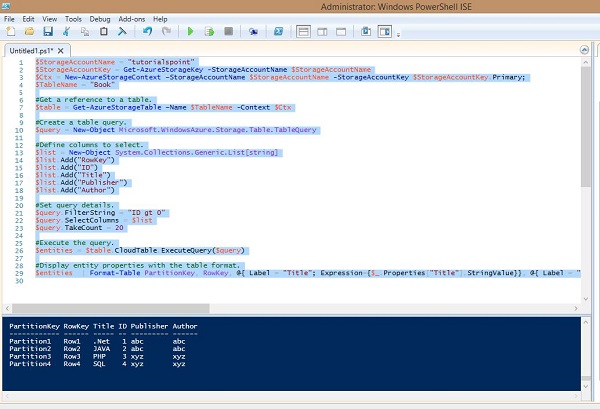
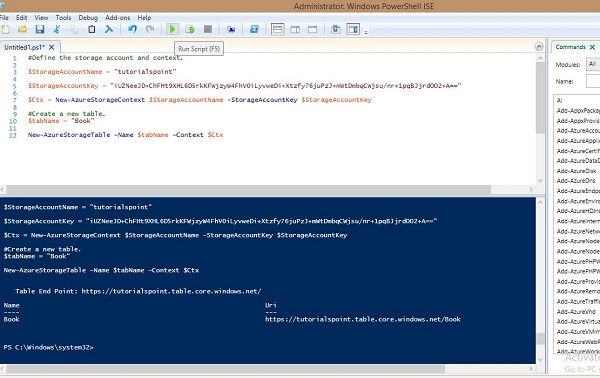 Similarly, you can retrieve, delete and insert data into the table using preset commands in PowerShell.